Using a smartphone to shoot a product is a clever way to do it. For people who are limited to standard photography equipment, you may use your smartphone. Recently, most smartphones already use high definition image capture, and it is very usable for you. You can utilize some life hack smartphone tips to shoot your product and get good results.
Most smartphones use an 8-16 mb resolution, and it’s good enough to deliver some fancy results. Meanwhile, you can also use an app to make a better result or to edit it. Life hack smartphone as a camera, with the right technique, the image result may be sharper, clearer, and better color. As long as you know.
How To Use a Smartphone As A Camera?
Today’s smartphone is amazing. When it comes to their ability to take pictures, you can find that the result is not that bad when you compare it to the pictures taken by a professional camera.
Sure, a smartphone’s camera will never topple a dedicated professional camera, at least for now. However, that does not mean you should shy away from using your smartphone as a camera.
Here are some life hack smartphone tips that you can try.
1. Know Your Smartphone and The Apps

An example: iPhone 5 has a camera with 8mb resolution
This is an important step before you take any photos. Just make sure your smartphone’s camera is good enough to produce some images. A good smartphone’s camera at least has 8mb in resolution. You may consider using some apps to take a shoot. An app usually better than original camera, because it full of setting.
For example, we use Camera+ because contains much technical color setting provided. After you get the apps, make sure you know how to use it, or you can learn first. Let’s assume you already know how to use this app, then, clean your phone camera in proper way. Again, make sure you don’t leave any dust or even your fingerprint.
Also Read: 6 Steps to Take Headshot Professional With Smartphone
2. Set a Lighting Condition

Window as natural lighting, use this as your own advantage (Image Courtesy : www.renovatorstore.com.au)
Lighting is the most essential part in photography, and you must set in descent way. You should know how to manipulate a lighting to get an advantage. Try to use some brightness to deliver a good result and easier to edit in post-production. If you have enough money, you can set the lighting conditions as pro. But if have low budget, you may use the window as natural lighting.
Also Read: Bright and Sharp Picture Using Smartphone
3. Create a Neutral Backdrop on a Table
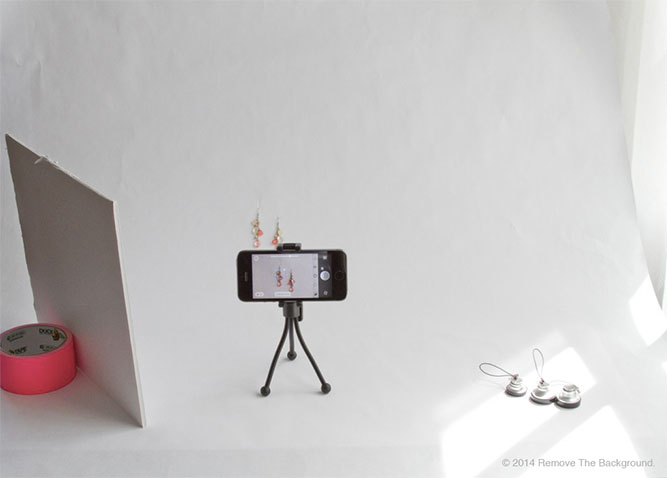
Use any white backdrop, an example, you can use a white roll paper
Color backdrop is important because in some conditions it will influence your product image. You just can’t use a backdrop, you must consider company’s brand whether is fit or not. Use a white backdrop, because it will give you clean look and produce a sharper images. After you set your lighting and backdrop, place your product over it. Put it in proper way, straight to lightning and your camera position.
Also Read: DIY Photo Backdrops Ideas
4. Start Shoot Your Product

Capture your product by put it over the backdrop and place your camera position straightly. (Image Courtesy : www.beadinggem.com)
Consistent shooting will help you to produce great pictures. Give some attention to any detail from your product. Also, you may consider to change your product placement. Give a mark to backdrop so you can use this setting again. Remember, repetition is key and consistency will give you more advantages to create a great images.
5. Get on Your Focus

You can wait till the camera get it own focus or you can set it manually
Exactly, you don’t need more effort to this because on many camera have an autofocus capability. Even though, you may set this while you take a shoot. Some phones may difficult to find the autofocus, and for quick result you also able to set manually.
6. Get Yourself A Tripod
Getting a good image is about having stability; if you cannot stabilize your camera, all your pictures will turn blurry.
Having a tripod or even a phone stand can help you stabilize your phone. It will be much better if your smartphone has a timer feature for the camera. The timer feature will allow you to take a picture without having to touch your smartphone, which can make it a little bit shaky.
Those are some life hack smartphone tips that you can try to use when you want to use your smartphone as a camera. A smartphone camera is not the best possible thing you can have to take a picture. However, it does not mean it is bad; in fact, if all you need is just a simple photography session to take a nice little picture, having a smartphone with a good camera is a good thing to have. Just follow all the tips above to have a nice photo session with your smartphone camera.
If you want to optimize your picture, then you need professional product image editing services. Dropicts is a professional photo editing company that can satisfy all your image editing needs.